Showing posts with label Facebook. Show all posts
Showing posts with label Facebook. Show all posts
How to Go Online on Facebook without Keeping the Page Open
♦ by Unknown Nov 6, 2012 Jun 2, 2012 0 comments

About Application
- See & Respond to chats from your desktop without opening the Browser or logging in to Facebook
- If you are surfing on other Web Pages, no need to switch to the Browser Facebook Tab
- It runs in background as soon as the Internet is connected to your System (Computer), you'll be seen online to your friends.You can open it from the Task bar (Pull out menu)
- If any one sends any message to you, a window starts with the chat box
Installation
To install this Software on Your P.C visit : https://www.facebook.com/about/messenger.Enjoy Chatting
Note: This Application only suite Windows OS
Facebook Timeline Cover Tips to Customize Your Dairy
♦ by Unknown Nov 6, 2012 Jun 2, 2012 0 comments

Following the global launch of Facebook Timeline , began to multiply on the Web app with collections of pictures to download and apply as a cover of his diary, with just the right size and resolution. Among them, Facebook Timeline Cover, offering a variety of interesting photos, allowing you to use them as cover profile in a simple click and create new ones. To add an image does not need to do is to allow ' application access to Facebook profile and start searching through the extensive photographic archive.

Pass the mouse over the image and then choose click on the button "Choose", so the photo chosen for the cover will be sent to your photos on Facebook. The cover will be placed in an album created by this application, entitled "Timeline Cover Photos". After choosing a cover from this application, go to your Profile Timeline and click the "Add Cover" on the right of your profile picture. If you already have a cover, you should choose the "Change Cover Sheet" that appears when you hover over the old cover.

Select menu "Choose from the photos," which will open a collection of recent images. Your new cover should be the first image of the collection. Click on the photo and Cover Timeline will be changed with the new photo. Click on "Save Changes" to complete the process. Sometimes you want to be unique and the app provides a way to customize many of the covers in the catalog. When you hover over a thumbnail for a cover, if you see a button "Personalize", which means you can add or edit text on the cover.

Do click on this button and the cover will fill the preview area at the top of the page, along with an editor on the left below it. Type a new text and adjust font size or left blank, and then click on "Use as Cover" when you are done. If you think that your friends wish to use a special cover you can share it with them. Pass the mouse over a thumbnail of the cover to reveal the "Share". Click on it and the cover is inserted in a message you can send to your friends on Facebook.
Facebook Seems to be Excluded from the list Chrome Browsers
♦ by Unknown Nov 6, 2012 Jun 2, 2012 0 comments
Facebook has apparently made Google Chrome browser out of the list of supported and recommended, instead highlighting Opera, according Favbrowser. The page looks like a new login to Facebook Mobile. It clear that the page is official because at the moment is no longer accessible:
https://www.facebook.com/unsupportedbrowser.
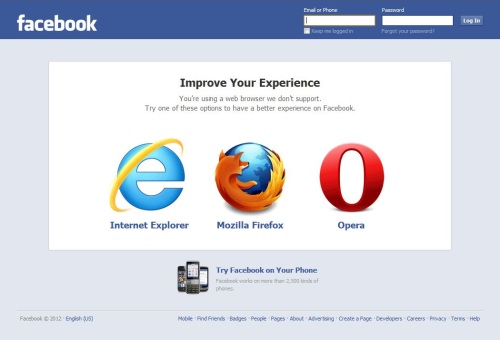
Beside Opera on the page stored in Google's cache are supported Internet Explorer and Mozilla Firefox. In the Facebook page of support are listed all four major browsers. It is unclear if the move makes sense, or what might have meant. Both Facebook and Opera have declined to comment.
Regardless, Facebook is still normally run using the Chrome browser. The switch is particularly noteworthy because of the rumors regarding the possible acquisition of Opera by Facebook. The social network, meanwhile, has long considered Google a competitor in the social field.
It 's well known that the relationship between Google and Facebook are constantly getting worse. It all started when Mountain View has launched Google + that has steadily improved , but recently Larry Page - Google CEO - has harshly attacked Facebook accusing it of "holding hostage to its users."
Via: CNet